AI Agent Techniques
Agents
An agent is an LLM given a goal, a set of tools and the ability to decide what to do next. Instead of one prompt in, one answer out, it runs in a cycle: read the current state, pick an action (call a tool, write a file), observe the result, decide whether to continue or stop.
What separates an agent from a chatbot is persistence and tool use. A chatbot answers a question. An agent can open a file, run a test, read the failure, fix the code and run the test again, without a human re-prompting it at each step.
Example
Point the agent at a repository and say “the checkout page throws a 500 in production.” It greps the error message against the codebase to find the failing handler, reads the last few commits that touched that file, reproduces the error locally, and writes and applies a fix. The result is a merged change that takes a specific production error rate back to zero, not just a diff that looks plausible.
The Agentic Loop
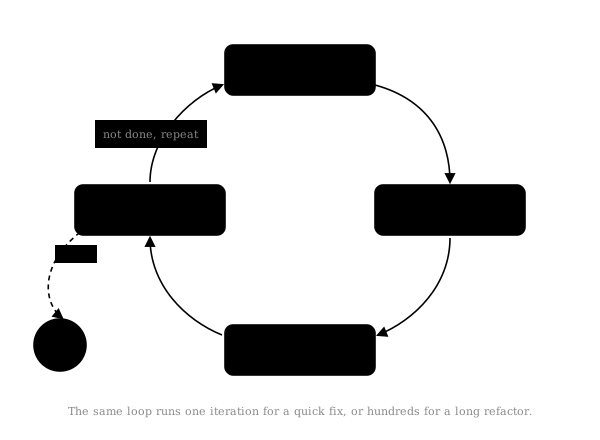
The core mechanism behind most coding agents is a loop: gather context, take an action, check the result, repeat until the goal is met or a stopping condition is hit.
while not done:
    context = gather_context()
    action = model.decide(context)
    result = execute(action)
    done = check_goal(result)
A good loop needs a clear termination condition, otherwise the agent spins forever burning tokens, plus a way to recover from failed actions and some record of what’s already been tried. Claude Code uses this pattern for everything from fixing a failing test to a scheduled task that pauses between runs and picks up with the previous context intact.
Example
Told to “make the test suite pass” in a Python repo, the loop is: run pytest, get exit code 1, parse the traceback to find test_checkout.py:42, open that file plus the function it tests, make an edit, run pytest again. Iteration one still exits 1 but a different test fails, iteration four exits 0. “Check goal” is just reading that exit code, the agent stops because a command returned zero, not because the output looks finished.
Skills
Skills are reusable instructions an agent loads on demand, when a task matches them, instead of holding every possible procedure in its default context. It’s the same idea as lazy loading in software: you don’t ship the whole library, you import the module you need when you need it.
A skill is usually just a markdown file checked into the repository, plus whatever scripts or reference docs it links to. Claude Code looks for a SKILL.md file with a short YAML frontmatter block (a name and a one-line description) followed by the instructions in the body. The agent scans every skill’s description and only loads the full body of the one that matches the task at hand:
---
name: deploy
description: Use when deploying this app to production
---

1. Run `npm test` and confirm everything passes
2. Bump the version in package.json
3. Run `npm run build`
4. Push to the `release` branch, do not push directly to `main`
That file lives at .claude/skills/deploy/SKILL.md, gets reviewed in pull requests like any other file, and updates the moment the deploy process changes, no separate documentation to keep in sync.
Contrast this with a project-wide instructions file like CLAUDE.md or AGENTS.md, also at the repo root but loaded into every session automatically rather than conditionally. CLAUDE.md/AGENTS.md is the standing context an agent always has about a project, skills are the procedures it reaches for only when a task calls for them.
Example
A repository has .claude/skills/deploy/SKILL.md and .claude/skills/code-review/SKILL.md checked in alongside the code. Ask the agent to “ship this to production” and it loads the deploy skill; ask it to “review this PR” and it loads the code review skill instead, each one pulling in only the instructions relevant to that request.
Model Context Protocol (MCP)
Skills solve how an agent gets instructions on demand. MCP solves how an agent connects to data and tools it doesn’t have built in. It’s an open standard, originally released by Anthropic, that defines a common interface for exposing a database, an API or internal tooling to any agent that speaks the protocol, instead of a bespoke integration per model.
Before MCP, connecting an agent to a company’s ticketing system meant custom glue code per model provider. With a shared protocol, the ticketing system exposes one MCP server, and any compliant agent, Claude, ChatGPT, Gemini, or something built in-house, calls it the same way. Same problem USB-C solved for chargers: one connector instead of one per device.
Example
A company runs one MCP server in front of its internal wiki, exposing a search_pages tool and a get_page tool. An engineer asks their agent “how do we roll back a bad deploy,” the agent calls search_pages("rollback deploy"), gets back three page titles and IDs, calls get_page on the most relevant one, and answers using that page’s actual content instead of guessing from training data. Swap the agent from Claude to Gemini and the same MCP server keeps working unchanged, because the integration lives in the protocol, not in either vendor’s SDK.
Subagents
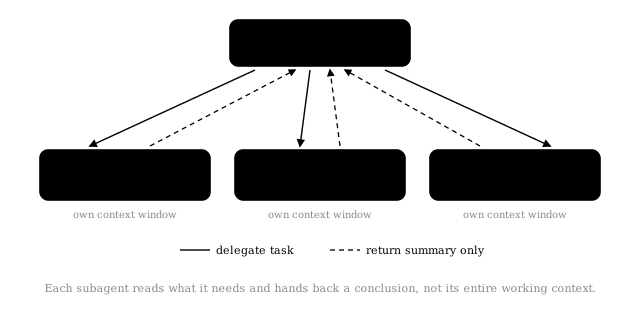
A subagent is a separate agent instance with its own context window, spawned to handle a self-contained piece of work so it doesn’t pollute the parent’s context with intermediate steps. A parent might spawn a subagent to search a large codebase and hand back only the conclusion, not every file it read along the way.
This matters for two reasons: an agent that reads fifty files to answer one question shouldn’t carry all fifty forward for the rest of the conversation, and independent subagents can run in parallel rather than one after another.
Example
Asked to review a 40-file pull request, a parent agent spawns three subagents in parallel: one reads every changed file and checks test coverage, one greps the diff against the project’s known security anti-patterns, one checks that public API signatures didn’t change without a changelog entry. Each subagent might read 15,000 tokens of code to do its job, but returns only a three-sentence verdict. The parent combines the three verdicts into one PR comment, having never carried more than a few hundred tokens of subagent output in its own context, and the three checks ran concurrently rather than one after another.
Agent to Agent
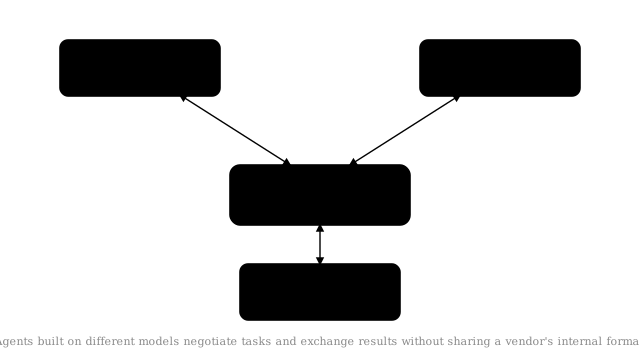
Agent-to-agent communication is multiple agents coordinating instead of one agent doing everything alone: split researcher, coder and reviewer responsibilities across separate agents that message each other, each with a narrower job and its own context.
One agent plans and delegates, others execute specific tasks and report back, and the coordinator decides what happens next. Unlike a subagent doing a one-off lookup, these setups are often long running, agents can be resumed, sent follow-up instructions, or left running in the background.
The hard part isn’t the messaging, it’s deciding what needs to cross the boundary. Pass too little and the receiving agent lacks context to decide well. Pass too much and you’ve recreated one giant context window split across multiple processes.
Subagents assume a single vendor’s harness underneath. Real agent-to-agent work often crosses vendors entirely, which is what the Agent2Agent (A2A) protocol is for. Originally built by Google and now governed by the Agentic AI Foundation under the Linux Foundation, backed by Anthropic, OpenAI, Microsoft and AWS, A2A defines an open format for agents to advertise what they can do, hand off tasks, and exchange results, regardless of the model underneath.
Example
A company’s internal release agent needs to check whether a third-party payment provider has an active incident before it deploys. Over A2A it sends a task request, “any active incidents affecting the payments API right now,” the provider’s own agent (built on a completely different model) replies with a structured result, and the release agent uses that answer to decide whether to proceed. Neither side had to be told what model, framework or vendor was running on the other end, they only had to agree on the A2A message format.
Evals
An eval is a repeatable test that measures how well an agent performs against a fixed set of tasks with known-good outcomes, the same way a unit test suite measures code rather than someone eyeballing the output. For a single-turn model that’s checking one answer against an expected one. For an agent it means checking a whole trajectory: did it call the right tools in a sensible order, avoid a destructive action along the way, and actually finish the task, not just produce plausible-looking output.
This matters more for agents than for plain chat because agents act. A chatbot’s wrong answer is a bad response, an agent’s wrong answer might have already deleted a file or spent money before anyone reads its output. Two checks run alongside each other: evals, which run offline against a test set before a change ships, and guardrails, which run live to catch unsafe or low-quality actions before they reach a user.
Where the eval data actually comes from
An eval set needs labelled examples, task in, correct-or-not out. For an agent those rarely start as a hand-written dataset, they get mined out of real usage:
- Log every run. Starting state (repo, commit), the exact prompt, every tool call in order, the final diff, and an outcome signal, did CI pass, did the user accept the change, did they reply “no, that’s wrong.”
- Flag the failures. A success shows the agent can do something, a failure shows exactly where it breaks, which is what a regression test needs.
- Turn a failure into a fixture. Starting commit, original prompt, and a grading check for what “correct” looks like, often just “these named tests pass” or “this file was not modified.” That triple is one eval case.
- Replay on every change. Before shipping a new prompt, model or tool set, every accumulated case reruns in a clean sandbox at its own starting commit, and the grading check decides pass or fail, no human reads the transcript.
- Track the pass rate over time. A case that used to pass and now fails is a regression, caught before production instead of after.
Example
Over a month, an internal coding agent handles 200 real “fix this failing test” requests, each logged with its starting commit, prompt and whether CI passed afterward. Engineers pull the 15 cases where CI still failed after the agent’s fix, and for each one write a fixture: check out that exact commit, replay that exact prompt, grade it by literally running the test suite it was supposed to fix. Those 15 failing cases, plus the 185 that already passed, become the standing eval set. Six weeks later someone edits the agent’s system prompt to make it more concise, the eval set catches that two previously-passing cases now fail, because the shorter prompt made the agent skip rerunning the tests before declaring victory, and that change gets blocked before it ships.
Other ways to structure an agent
A few more patterns worth knowing, alongside the core ones above:
- Memory - persisting facts, preferences or task state across sessions, rather than starting from a blank context every time. Claude, ChatGPT and Gemini all now ship some form of this. Example: during one code review three weeks ago, the agent is told this team always squashes commits and never force-pushes to
main. That preference gets written to a memory file, and every session since applies it automatically, without anyone repeating the rule. - Plan mode / human-in-the-loop - having the agent propose a plan and pause for approval before it touches anything, useful for actions that are expensive or hard to reverse. Example: asked to “clean up the old feature flags,” the agent first lists every flag it intends to delete and every file it will touch. A person reviews that list and vetoes two flags that are still in use in a rarely-run cron job, only then does the agent make the edits, avoiding an outage a blind execution would have caused.
- Computer use / browser agents - instead of calling APIs, the agent controls a screen directly, clicking, typing and reading pixels, for the many tasks that don’t have a clean API to call. Example: a legacy internal admin panel has no API, only a web UI, so the agent logs in, navigates to the user record, updates a field and clicks save, the same sequence of clicks a person would make, because that’s the only interface that exists.
Claude, ChatGPT and Gemini in practice
The concepts above are shared across the industry, each provider just packages them differently.
| Technique | Claude | ChatGPT / OpenAI | Gemini / Google |
|---|---|---|---|
| Agent framework | Claude Agent SDK (built on the Claude Code harness) | Agents SDK + AgentKit | Gemini Enterprise Agent Platform / Antigravity |
| Skills | Native Skills, loaded on demand (progressive disclosure) | Custom GPTs and tool configs cover similar ground, less formalised as “skills” | Extensions and slash commands in Gemini Code Assist |
| Subagents | Built in, each with its own context, tools and skills | Being added to the Agents SDK for Python and TypeScript | Multi-agent orchestration via Antigravity and Agent Registry |
| Long-running / background tasks | Loop-style scheduled runs, background sessions that resume with context intact | Background Mode for long-running tasks | Agent Runtime for persistent, long-running execution |
| Cross-agent communication | Native session-to-session messaging, plus A2A support | A2A support alongside its own Agents SDK handoffs | Originated the A2A protocol, deep first-party support |
| Tool integration | MCP support | MCP support | MCP support via Gemini Code Assist |
This space moves fast: ChatGPT’s original “agent mode” was retired in 2026 in favour of ChatGPT Work, and Google folded several separate tools into Antigravity the same year. Treat this table as a snapshot, not a permanent fact.
Why this matters
None of this makes the underlying model smarter. It gives that model better structure to work within, smaller contexts, reusable procedures, a goal broken into pieces that can be delegated, looped over, or run independently. The more agentic tooling develops, the more the engineering problems look like distributed systems design rather than prompting.